Configuring an Address Record
To Configure an Address Record
An Address Record may contain only one address. To send multiple notification types to the same recipient create an Address Record for each notification type and then use a Group Record to group the addresses. The format of the addresses for the different notification types are shown in the table below.
- Using CygNet Explorer, right-click in the GNS pane and select New.
- Type the ID and Description for the record.
- In the Type box, select Address.
- Click on the Addresses page.
- Click New to open the Notification Address for GNS ID dialog box.
- In the Type box, select the notification address type.
- In the Address box, type the address applicable to the notification type. See the table below for the appropriate address format.
- In the Description box, enter a description for the recipient. This property is optional.
- For Numeric pager only, set a Numeric Delay.
- Set the options for each of the subsequent properties for this notification record. Each property is described in the table below.
- Propagate resend rules down
- Report Alarm Clear
- Ignore all previous resend rules
- Acknowledgment
- Resend
- Blackouts
- Click OK to save the recipient information.
- Click OK to save the notification record.
|
Click the thumbnail to see |
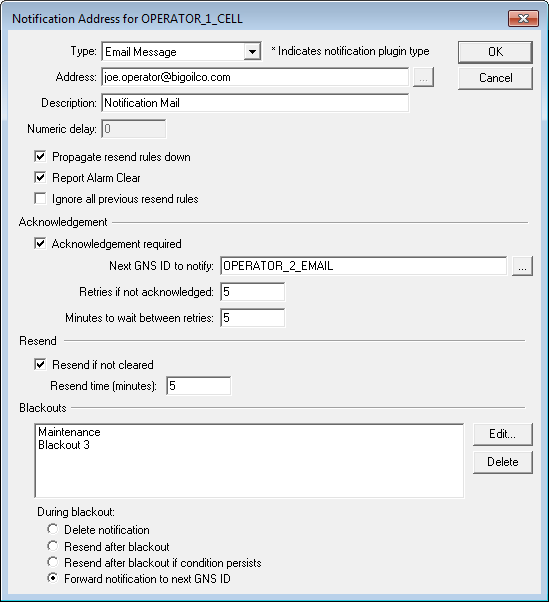
The properties on the Notification Address dialog box are described in the following table.
| Property | Description | |
|---|---|---|
|
Type |
The type of notification for this recipient. See Notification Address Types for more information about each type. |
|
|
Address |
Specifies the address applicable to the notification type. See Notification Type Address Formats below. |
|
|
Description |
Specifies an optional description for the recipient. |
|
|
Numeric Delay |
Specify the number of delays to include in the dial command line. The number of delays translates to a dial modifier (,), which causes the modem to pause after dialing. ExampleFor a pager address of 555124, a Numeric Delay of 2, and a numeric message of 41, the resulting ATDT line looks like this: ATDT 5551234,,41 causing the modem to pause twice after dialing the pager address. The pause length is determined by a register setting on the modem, usually two seconds per comma. Note: |
|
|
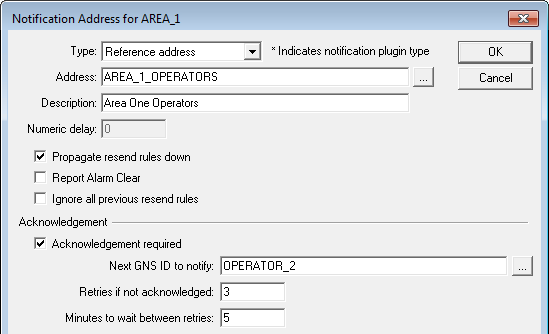
Propagate resend rules down applies only to Reference Address recipients in Event and Group records. If this option is enabled, the Acknowledgment, Resend, and Blackout settings are propagated to all referenced recipients. The system does not, however, propagate the rules to the record specified in the Acknowledgment Next GNS ID to Notify box. In the following example, the Acknowledgment settings will be propagated to all records in the AREA_1_OPERATORS record. If AREA_1_OPERATORS contains references to other records, the rules will be propagated to those records as well. The top-level resend rules take precedence over rules defined in a referenced record. If propagation is not active, the referenced record’s rules apply.
|
||
|
Click Report Alarm Clear to send a notification when an alarm clears. This property applies to all referenced recipients. It does not, however, apply to the record specified in the Acknowledgment Next GNS ID to Notify box. That record will not receive a notification when an alarm clears. Note: This check box must be enabled for the address recipient to receive a Clear message configured on the Messages page of the GNS record. |
||
|
Click this setting to ignore all previous resend rules propagated to this notification. This allows the notification to reject any resend rules that might propagate down from the event, and to override those rules with its own resend rules. |
||
|
Acknowledgment Required |
Click Acknowledgment Required to indicate that this notification requires an acknowledgment. Each notification requiring acknowledgment is assigned an acknowledgment ID (Ack ID), which is sent as part of the notification and displayed in the GNS Queue. Any type of notification can require an acknowledgment, although the method of acknowledgment depends on the type of notification. See also Acknowledging Notifications for more information. Any type of notification can be acknowledged via the GNS Queue using CygNet Explorer. Additionally notifications can be acknowledged by sending an email or SMS back to the GNS. See Acknowledging Notifications Via Email for more information about this method of acknowledgment. If the notification type is a Voice Address notification, the recipient will have the option of acknowledging while on the line with the system. Other methods to acknowledge a Voice Address notification include: dialing in to the system and entering the acknowledgment ID (this requires that the host have a Dialogic board or a SIP Server), using CygNet Explorer and acknowledging the message in the GNS Queue, or sending an acknowledgment email. The GNS can be configured to append the response phone number to messages that require acknowledgment. Acknowledgment Required Settings If the configured recipient of the notification does not acknowledge the callout, the Acknowledgment Required settings tell the system how to handle the notification. The notification will be resent the number of times specified in the Retries if not acknowledged option, with a delay in minutes specified in the Minutes to wait between retries option. Once the number of retries is exhausted, if the configured recipient has still not acknowledged the notification, it will be sent to the GNS ID specified in the Next GNS ID to Notify field. Note: If Acknowledgment Required is checked, you must either set Retries to a number greater than zero or specify the Next to Notify recipient. These two items (Retries if not acknowledged and Next GNS ID to Notify) will put the notification in the Resend Queue. If the notification is acknowledged, then the message is removed from the Resend Queue because the expected action (acknowledgment) has been completed. If there are no Retries or Next to Notify values set, the notification is never placed on the Resend Queue because no further action is expected or required. Additionally, if there is no Next to Notify set and the last retry has occurred, the notification is removed from the Resend Queue, again because there is no further action to take. Acknowledging a notification removes all items with the same acknowledgment ID from the GNS Queue or the Resend Queue. |
|
|
Specifies the next GNS ID to send the notification to, once the retries are exhausted, if the recipient has not acknowledged the notification. Note: The Report Alarm Clear and Resend if not cleared options are not applicable to Next GNS ID to notify recipients. |
||
|
Specifies the number of times the notification will be resent if not acknowledged. The default value for Retries is 0. |
||
|
Minutes to wait between retries |
Specifies the number of minutes to delay before resending the notification. The default value for Minutes Between Retries is 0. |
|
|
Resend if not cleared |
Click Resend if not cleared to continue to resend the notification to a recipient as long as the alarm is set. This property applies to all referenced recipients. It does not, however, apply to the record specified in the Acknowledgment Next GNS ID to Notify box. |
|
|
Resend time (minutes) |
Specify the interval (in minutes) for the notification to continue to be sent. |
|
|
Edit... |
Click Edit... to configure a blackout period during which scheduled recipients are not sent notifications. See Configuring Blackouts for more information. |
|
|
Delete |
Click Delete to remove an existing blackout from an address record. |
|
|
During blackout |
Select one of the following options: During a blackout the notification will be handled in the following manner:
The selected option applies to all blackouts assigned to the selected notification recipient. |
|
Notification Type Address Formats
The following table provides more detailed information about the notification types.
| Notification Type | Abbreviation | Description | Address Format | Example | Usage Notes |
|---|---|---|---|---|---|
|
Alphanumeric Page |
AP |
An Alphanumeric Page notification type uses the Microsoft Telephony Application Programming Interface (TAPI) protocol to send an alphanumeric message to an alphanumeric pager. You must know the PIN number of the pager as well as the modem phone number of the paging company. The GNS can be configured with a default modem number. |
PIN or PIN@ModemNumber |
123-4567 123-4567@1-800-555-1212 |
Use the PIN format if the modem number is configured in the GNS configuration file. Use the PIN@ModemNumber if you are not sure. See the note below table. |
|
Comm Port Address |
CP |
A Comm Port Address notification type sends an alphanumeric message to a communications port. |
Comm port number |
COM1 |
|
|
Net Send Address |
NS |
A Net Send Address notification type sends a network message to other users, computers, or messaging names on the network. No configuration keywords are required for Net Send messages. However, the network and computers must have Messaging enabled to allow Net Send messages. Note: Net Send does not work on Windows Vista or later. |
IP Address or Machine Name |
192.164.1.202 FT1278W2K |
Machine name is case sensitive. Note: Net Send does not work on Windows Vista or later. |
|
Numeric Page |
PG |
A Numeric Pager notification type sends a numeric message to a numeric pager. |
Pager number |
1-800-555-1212 |
See the note below table. |
|
Reference Address |
RA |
A Reference Address notification type references another record in the GNS database. It is used to associate different record types. See Best Practice for Setting Up Notification Types for more information. |
ID of GNS record |
OPERATORS |
Click … to browse to select a GNS ID to use as the reference address. |
|
Email Message (or SMS Text Message) |
SM |
A Email Message notification type sends an email message via an SMTP server or Graph API server. This notification type is also used to send a notification as an SMS text message to a mobile phone. The GNS must be configured with authorization mode to indicate the type of server used, the server name, and authentication credentials. See the note on Notification Address Types about this type of notification. |
Valid email address |
user.name@Acme.com |
Can include SMS message sent via email to an SMS gateway address, for example, 8051234567@txt.att.net, 8059876543@vtext.com |
|
SNPP Message |
SP |
An SNPP Message notification type sends a text message using the Simple Network Paging Protocol (SNPP). |
Mobile phone number or pager number |
1-800-555-1212 |
|
|
Voice Address |
VA |
A Voice Address notification type sends a spoken message to a telephone. This notification type requires the use of a SIP Server or a Dialogic board and text-to-speech software (MSSAPI). |
Telephone number |
1-800-123-4567 |
See the note below table. |
|
WAV Address |
WA |
A WAV Address notification type sends a WAV file to a telephone. This notification type requires the use of a SIP server or Dialogic board and text-to-speech software (MSSAPI) to play to the file. The supported WAV file formats are:
When the notification type is WAV Address, the file(s) specified in the Wave Msg field on the Messages page are played to the recipient. WAV files can be concatenated. This is achieved by listing files in playback order with a semicolon to delimit the individual files (for example, Area1.wav; ComprAlarm.wav). |
Telephone number |
555-1212 |
See the note below table. |
|
*<Notification Plugin Type Name> |
configurable, but must start with "Z" |
A notification of this type requires the installation and configuration of a third-party notification plugin. See CygNet Notification Plugin Interface for more information. |
Depends on the requirements of the third-party plugin, for example, email address, phone number, or a short list of number or letters, etc. |
user.name@acme.com 1-800-555-1212 Regular Expression: ^(\+\d{1,2}\s)?\(?\d{3}\)?[\s.-]\d{3}[\s.-]\d{4}$ |
Configure the email address, phone number, or regular expression to whatever the plugin is expecting. |
Note: Dashes — The dashes in paging, voice, and WAV addresses are for visual clarity only and are not required. The addresses can include digits for obtaining an outside line and commas for a pause (a comma is a one-second pause). For example, 9,, 1-800-555-1212. This address dials 9 for an outside line, pauses for two seconds, and then dials the number.
More:


